Checklists with photos on every question.
FieldPix has 16 checklists built in, for solar surveys and installs, roof inspections, heat pump installs and home inspections, and you can build your own. Any question can ask for photos, every answer saves as you go, and the finished checklist goes into the PDF report.
14 days free, no card · $49.99/month for your whole crew (up to 5), about $10 a person
What FieldPix checklists do.
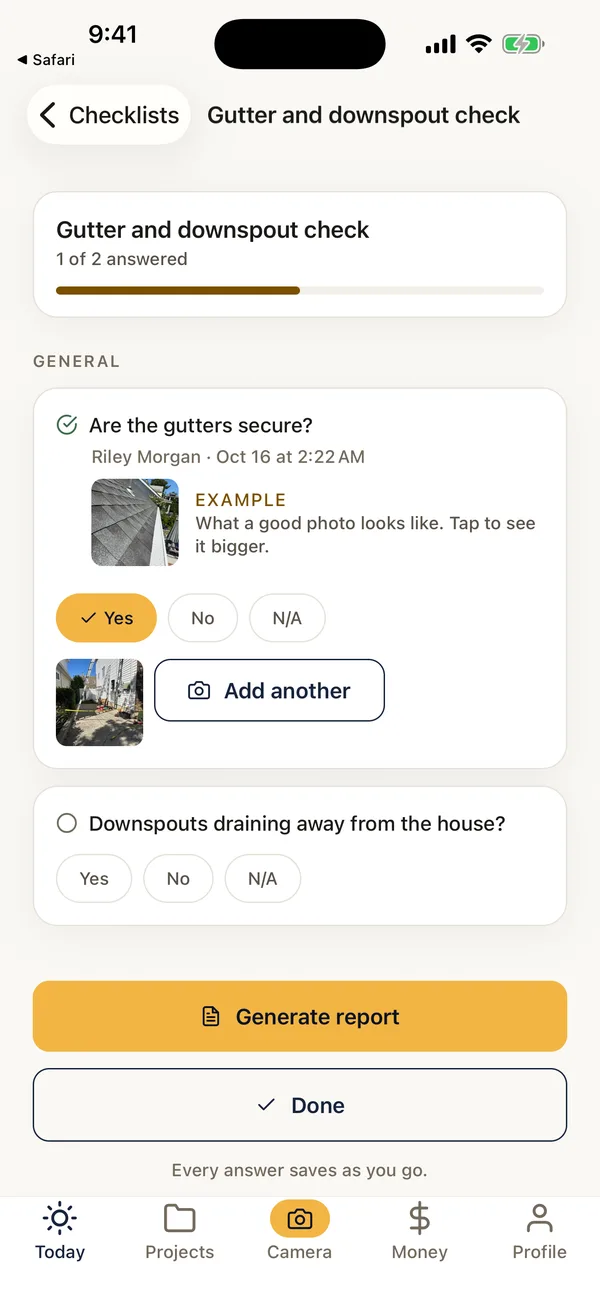
FieldPix is a job site photo app for contractors, with checklists built in. Load a checklist on the job, and the crew works through it on the phone: yes or no, a choice, a reading, and the photos each question asks for. Photos are stamped with the date, time and location and filed to the job. The office sees the answers in the web portal, and the checklist goes into the job's PDF report.
- Built in: 16 checklists for solar, roofing, heating and cooling, and inspections. Copy any of them to make it your own.
- Questions: yes or no, one or several choices, written answers and readings, and photos, with help text and example photos.
- Works on: iPhone, iPad and Android, plus a web portal for the office.
- Price: included on both plans, $49.99 a month for up to 5 people or $99.99 for unlimited. Pricing details. 14 days free, no card.
Sixteen checklists, ready on day one.
Load one on a job in one tap, or copy it and change the questions.
Solar
- Site survey
- Solar site survey: detailed (roof planes, attic and structure, shading, busbar)
- NY/NJ site survey
- String and optimizer (DC) system install
- Microinverter (AC) system install
- Battery install
- Two install checklists that follow a solar financing program's photo list
Roofing
- Roof inspection: the ground and the attic first, then covering, flashing and penetrations, edges and drainage
Heating and cooling
- Heat pump install photos, before and after (follows New York's Clean Heat list, in English and Spanish)
- An HVAC install manual that follows a financing program's list
Inspections and real estate
- Home inspection
- Mold inspection
- Appraiser walkthrough, with condition (C1–C6) and quality (Q1–Q6) ratings
- Pre-closing walkthrough
- Post-closing walkthrough
The built-in checklists' questions are in English. Printable versions are in the guides, such as the roof inspection, solar site survey, home inspection and mold inspection checklists.
More than a tick box.
From the template to the report.
- Pick a checklistLoad a built-in one on the job, or one your company made. Watch: Checklists for every job
- Fill it in on siteAnswer each question and take the photos it asks for. Every answer saves as you go.
- Check it from the officeOpen the filled-in checklist with its photos in the web portal, or build new ones there. Watch: Checklists on the web portal
- Send the reportTurn the job into a PDF with your logo, the checklist included, for the client or the program. Watch: PDF reports in one tap
Questions about checklists.
Is there a construction checklist app with photo capture?
Yes. FieldPix is a job site photo app for contractors with checklists built in. Any question can ask for photos, taken right there from the question, and every photo is stamped with the date, time and location. Answers save as you go and the finished checklist goes into the job's PDF report.
Which checklists are built in?
Sixteen, for solar site surveys and installs, roof inspections, heat pump installs, home and mold inspections, appraisals and real estate walkthroughs. Load one on a job in one tap.
Can I make my own checklists?
Yes. Build one from scratch, or copy a built-in one and change it. Questions can be yes or no, a choice from a list (one answer or several), a written answer such as a reading, or a photo, and any question can ask for photos as well.
Can I show my crew what a good photo looks like?
Yes. Add an example photo to a question on your own checklists, and the crew sees it right under the question while they fill it in, with a tap to see it full size.
Who answered each question?
Every answer shows who gave it and when, so the office can see who checked what on the job.
Can I print a blank checklist?
Yes. The guides have free printable versions of several of them in PDF, Word and Excel, such as the roof inspection, solar site survey, home inspection and mold inspection checklists.
Do checklists work on the web portal?
Yes. The office can build and edit checklists, and open the filled-in ones with their photos, in the web portal. The crew fills them in on the phone.
What does FieldPix cost?
Flat per company, not per person: $49.99 a month for up to 5 people, or $99.99 a month for as many as you want. Every feature is on both plans. A plan covers one business and the people who work for it; if you run two companies, each gets its own plan. Pay yearly and get two months free. Every plan starts with a 14-day free trial, no card needed.
 14-day free trial
Run your next checklist in FieldPix.
There's nothing to pay during the trial, and no card to enter.

