Talk through the job. Get the notes in writing.
Site visit notes from your voice: record while you walk the site, say what you see and snap photos. FieldPix writes the notes for every area, files the photos under each one and lists every follow-up. No typing up notes after the job.
14 days free, no card · $49.99/month for your whole crew (up to 5), about $10 a person
What FieldPix is.
FieldPix is a job site photo app for contractors. You walk the job, talk and snap photos, and the AI walkthrough writes the site visit notes from your voice: a section for each area, your measurements and problems as you said them, the photos filed under each, and an action list. Nothing to type up after the job. Photos are stamped with the date, time and location.
- Who it's for: roofing, solar, remodeling, restoration and inspection crews of 1 to 30 people.
- Works on: iPhone, iPad and Android, plus a web portal for the office. English and Spanish.
- Also included: PDF reports with your logo, checklists, proposals, e-signed agreements, invoices and payments, including Tap to Pay on iPhone.
- Price: $49.99 a month for a company of up to 5 people, $99.99 for unlimited. Every feature on both plans, no AI credits to buy; fair-use limits apply. Pricing details.
- Trial: 14 days free, no card. 30-second demo.
Four steps, no typing.
- Open the job and tap WalkthroughThe recording starts on your phone. Watch: Walk the site with AI
- Walk and talkSay what you see, what you measured and what needs doing. Pause when you move to a new area.
- Snap photos as you goEach photo is stamped with the time, date and location and filed under the area you were talking about. Watch: Take stamped photos
- Tap DoneFieldPix writes a section for each area, puts the photos under the right one, and adds a summary and an action list. Review it, then share it or save it as a PDF.
What you said, organized.
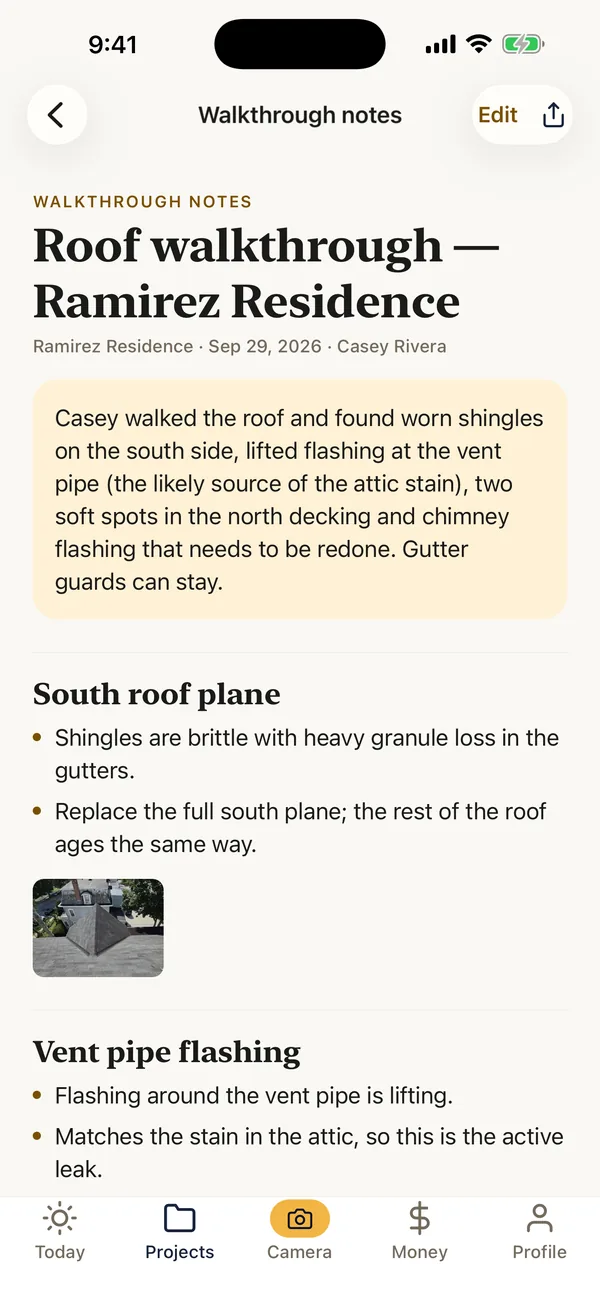
Here's what a two-minute roof walkthrough turns into.
You say“Vent pipe flashing is lifting. That matches the stain in the attic.”
- Flashing around the vent pipe is lifting.
- Matches the stain in the attic, so this is the likely leak.
You say“Two soft spots in the north decking.”
- Two soft spots in the north side decking.
You say“Chimney flashing is cracked, needs to be redone.”
- Chimney flashing is cracked and needs to be redone.
- Replace the lifted vent pipe flashing
- Cut out and replace two north deck sections
- Re-flash the chimney
Example from a demo job. Your notes follow what you actually say, with your photos filed under each section.
One recording, several documents.
The notes are a starting point. From the same walkthrough you can make:
- A daily log for the office (what a good one includes).
- A punch list of what is left to do.
- A client update you review before it goes anywhere.
- A PDF to send or file.
What it does not do. It does not measure from photos, and it does not send anything to a client on its own. It writes from the sound of your voice, so talk as you go.
Questions about the AI walkthrough.
Is there an app that writes site visit notes from my voice?
Yes. FieldPix is a job site photo app for contractors with an AI walkthrough: you record while you walk the job, say what you see and snap photos, and it writes organized site visit notes with the photos filed under each area and a list of follow-ups. It runs on iPhone, iPad and Android, with a web portal for the office.
Is there an alternative to typing up site notes after every job?
That is what the AI walkthrough replaces. Talk while you are on site, and the notes, the photo captions and the to-do list are written by the time you are back in the truck. You review them before anyone else sees them, and the same recording can become a daily log, a punch list or a client update.
Does FieldPix work for roofing, solar and other trades?
Yes. Roofers, solar installers, remodelers, restoration crews and inspectors can use the same walkthrough. Say the trade's own words (flashing, decking, racking, conduit) and they land in the notes as you said them. There are built-in checklists for roof inspections and solar site surveys.
How much does the AI walkthrough cost?
It is included in every FieldPix plan: $49.99 a month for a company of up to 5 people, or $99.99 a month for unlimited people. Every feature is on both plans, with no AI credits to buy; fair-use limits apply. The first 14 days are free and no card is needed.
How does the AI walkthrough work?
Open a project in the FieldPix app and tap Walkthrough. Talk through what you see as you walk the site, and take photos along the way. When you tap Done, FieldPix transcribes the recording and writes organized notes: a section for each area with the measurements, problems and decisions you mentioned, the photos from that part filed under it, a short summary and an action list of every follow-up.
Does FieldPix measure from the photos?
No. FieldPix writes from what you say, not from what the camera sees. Say your measurements and readings out loud and they land in the notes.
Does the AI walkthrough work in Spanish?
Yes. Walkthroughs work in English or Spanish, and any AI document can be translated between the two in a tap.
Does the AI walkthrough work with no signal?
Yes. A walkthrough recorded with no signal saves on the phone. Finish it from the project page when you're back in coverage and the notes are written then.
What happens to my recording and photos?
FieldPix uses them to write the document you asked for, and you review it before anyone else sees it. What it sends to write the document isn't used to train AI models. The privacy policy has the details.
Does the AI walkthrough cost extra?
No. AI walkthroughs are included on both plans, with no credits to buy. Fair-use limits apply.
 14-day free trial
Record your first walkthrough.
There's nothing to pay during the trial, and no card to enter.

