Every photo stamped, filed to the job, ready for the report.
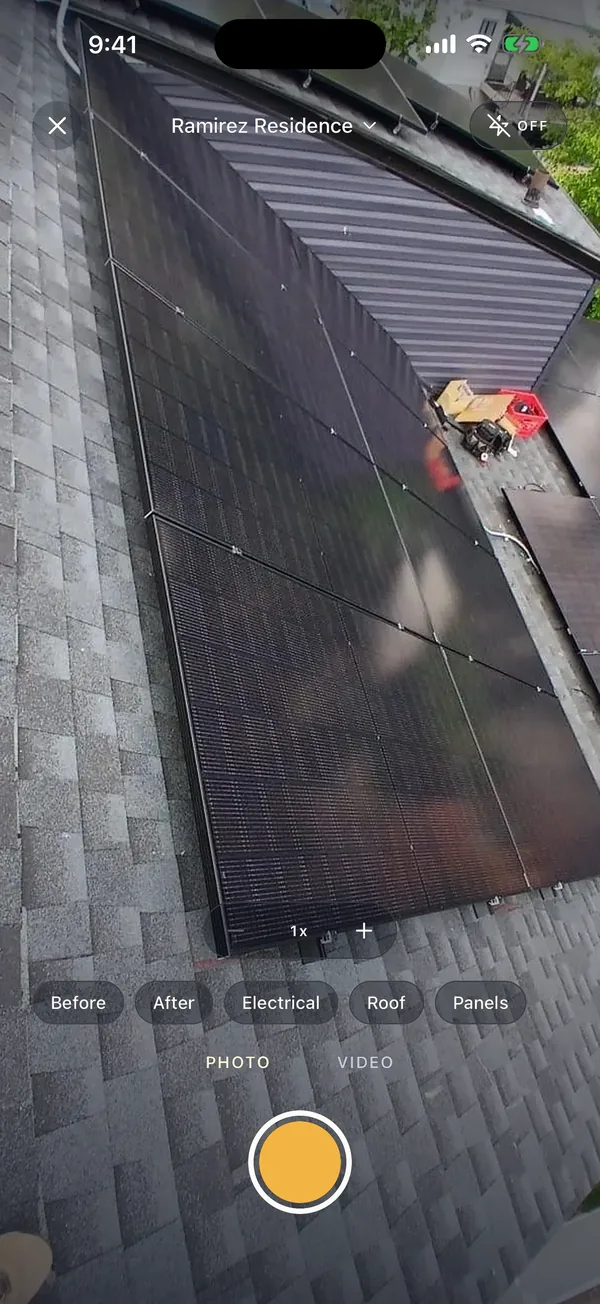
Shoot from inside the job and each photo gets the date, time and location burned in, a tag, and the name of who took it. No signal needed. Then one tap makes the PDF.
14 days free, no card · $49.99/month for your whole crew (up to 5), about $10 a person
What a job site photo app should do.
FieldPix is a job site photo app for contractors. Photos are stamped with the date, time and location, filed to the right job as you shoot, and kept when there is no signal. From the same job you get a branded PDF report, markup on any photo, a private link for the client, and site notes written from your voice.
- Stamp: date, time and address or GPS burned into the image, plus who took it.
- Filing: open the job, shoot, tag. Nothing to sort from the camera roll later.
- Offline: photos and video save on the phone and upload when you are back in range.
- Reports: one tap to a PDF with your logo, photos grouped by tag, each with its stamp.
- Works on: iPhone, iPad and Android, plus a web portal for the office. English and Spanish.
- Price: $49.99 a month for a company of up to 5 people, $99.99 for unlimited. Pricing details. 14 days free, no card.
Proof that stays on the photo.
Job photos end up in disputes, insurance claims and inspections. The stamp is in the pixels, not in a file field that gets stripped when the photo is texted or emailed.
More: job site photos that hold up in a dispute · 10 questions to ask before you choose a photo app
From the camera to a PDF in one tap.
Your logo on the cover, the job and the client, then every photo with its date, time and address, grouped by tag.

Shoot it once, in the right place.
- Open the jobAdd the address and the client once. Everyone on the crew sees it. Watch: Start a job
- Shoot from inside the jobTap a tag, take the photo. It is stamped and filed before you lower the phone. Watch: Take stamped photos
- Mark what mattersCircle the problem on the photo and leave a note for the crew or the office. Watch: Draw on photos and leave notes
- Make the reportOne tap turns the job's photos into a PDF with your logo, for the client or the adjuster. Watch: PDF reports in one tap
Photos and notes on the same job.
Photos show what was there. The AI walkthrough explains it: talk while you walk the site and FieldPix writes the site notes, with the photos you took filed under each area. The report carries both.
“Our guys hit record, walk the roof and talk. By the time they’re back in the truck, the notes and the photos are already at the office.”
 Owner, State Solar
Questions about job site photos.
What is the best job site photo app for contractors?
A job site photo app should file every photo to the right job as you shoot, stamp it with the date, time and location, keep working with no signal, and turn the photos into a report your client or an adjuster can read. FieldPix does all of that for roofing, solar, remodeling and restoration crews, and it also writes the site notes from your voice, so photos and notes land on the same job. One flat price per company, every feature on every plan, 14 days free with no card.
Does FieldPix stamp photos with the date, time and GPS location?
Yes. The date, time and location (the street address, or the GPS coordinates) are burned into the image itself before it uploads, so a forwarded or downloaded copy still shows them. Every photo also records who took it.
Does FieldPix work with no cell signal?
Yes. On a roof, in a basement or on a new build with no reception, photos, videos and walkthrough recordings save on the phone and upload on their own when you are back in range. The stamp uses the time and location from when you took the shot.
How are photos organized by job?
You open the job first and shoot from inside it, so nothing lands in the camera roll to sort later. Tag photos as you go (before, after, roof, electrical, or your own tags), and the web portal shows every job's photos by day and by tag. Photos taken outside the app can be uploaded to a job too.
Can I make a PDF report from the photos?
Yes. One tap turns a job into a PDF with your logo on the cover, the job and the client, then every photo with its date, time and address, grouped by tag. Checklists and walkthrough notes can go in the same report.
Can I mark up a photo?
Yes. Draw on any photo to circle the problem, add an arrow or leave a note. The original is kept, and your crew sees the note on the photo.
Can my client see the photos?
Only what you share. Each job can have a private link that shows the client the job's stage, the photos and reports you mark for them, and the comments you choose to send. You can turn the link off at any time.
What does FieldPix cost?
Flat per company, not per person: $49.99 a month for up to 5 people, or $99.99 a month for as many as you want. Every feature is on both plans. A plan covers one business and the people who work for it; if you run two companies, each gets its own plan. Pay yearly and get two months free. Every plan starts with a 14-day free trial, no card needed.
 14-day free trial
Stamp your next job's photos with FieldPix.
There's nothing to pay during the trial, and no card to enter.

