No signal on the roof? Keep shooting.
FieldPix keeps working where your phone has no bars. Photos, video and walkthrough recordings save on the phone and upload on their own when you are back in range, and every photo keeps the time and place it was taken.
14 days free, no card · $49.99/month for your whole crew (up to 5), about $10 a person
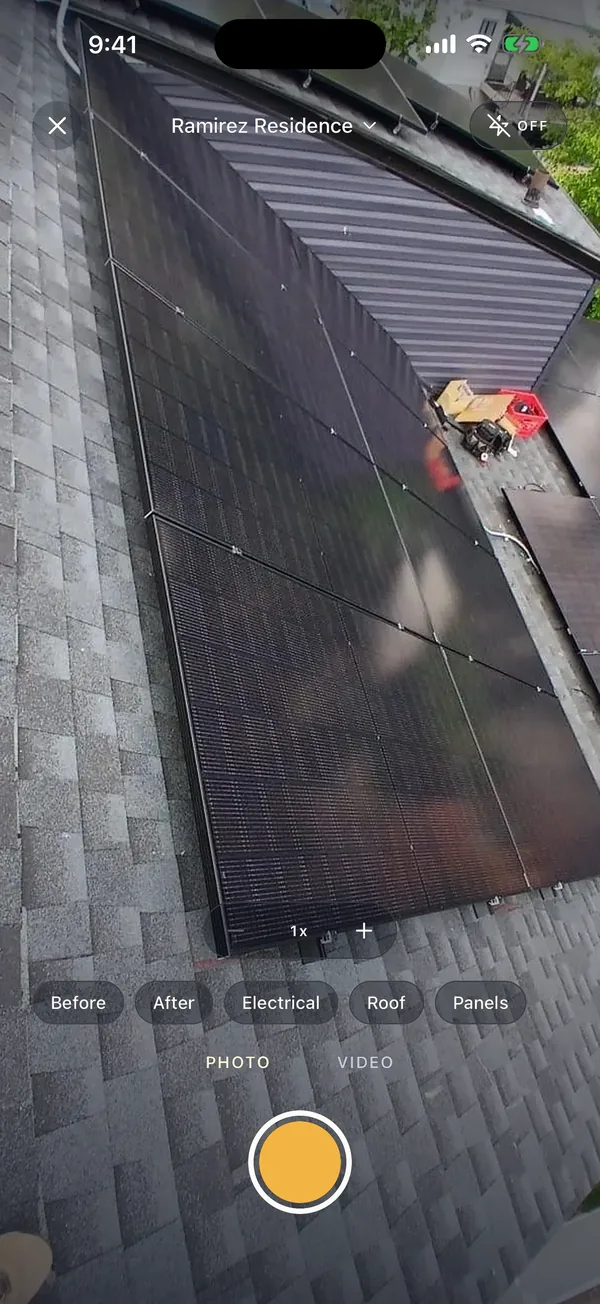
What FieldPix does.
FieldPix is a job site photo app that works with no cell signal. On a roof, in a basement, in a steel building or on a new build with no service, the crew keeps shooting and recording. Nothing is lost when the app has no connection.
- Saved on the phone: photos, videos and walkthrough recordings, filed to the job.
- Stamped at the moment: the date, time and GPS location are from when the photo was taken.
- Uploads itself: everything goes up when the phone is back in range, or on Wi-Fi only if you prefer.
- Written later: a walkthrough recorded offline finishes on its own once its photos upload, and the notes are written then.
- Works on: iPhone, iPad and Android. $49.99 a month for up to 5 people; 14 days free, no card.
What happens to a photo with no signal.
- Shoot inside the jobThe photo is stamped with the time and GPS location and filed to the job, even with no bars. Watch: Take stamped photos
- It waits on the phoneThe app shows how many photos are waiting. Closing the app or restarting the phone doesn't lose them.
- Back in range, it uploadsPhotos go up on their own, and the office sees them in the web portal.
- Then the paperworkFinish the walkthrough to get the notes, and make the PDF report from the job. Watch: PDF reports in one tap
Getting photos off a roof with no signal.
- Check the waiting count before you leave the site, or as soon as you are back in range.
- Keep the app on the job you are working, so every photo is filed in the right place from the start.
- If you upload on Wi-Fi only, use Upload now when the office needs the photos sooner.
- Checklists need a connection. Fill in checklist questions with photos once you are back in range; plain photos can wait on the phone.
- Leave room on the phone. Photos and video wait on the phone until they upload.
More: how the date, time and GPS stamp works · everything the FieldPix camera does.
Questions about working offline.
Is there a photo documentation app that works with no cell signal on a roof?
Yes. FieldPix keeps working with no signal. Photos, videos and walkthrough recordings save on the phone and upload on their own when the phone is back in range, and photos are stamped with the time and GPS location of the moment they were taken. The crew does not have to remember to do anything.
Do photos taken offline keep the right time and location?
Yes. The phone's clock and GPS work without cell service, so the stamp shows when and where the photo was taken, not when it uploaded. With no signal the place is shown as GPS coordinates, because looking up the street address needs a connection.
What works with no signal?
Taking photos and video, tagging them, and recording a walkthrough. Everything saves on the phone and waits for a connection.
What needs a connection?
Anything that has to reach the server: writing the AI notes, making and sending reports and links, checklist photos, proposals and card payments. A walkthrough recorded offline finishes on its own after its photos upload, and the notes are written then.
Can I upload only on Wi-Fi?
Yes. You can tell the app to wait for Wi-Fi to save data. It shows how many photos are waiting, and Upload now sends them over cellular whenever you choose.
How do I know everything uploaded?
The app shows how many photos are still waiting to upload. Uploads retry on their own, and Sync now on your Profile tries again right away.
What does FieldPix cost?
Flat per company, not per person: $49.99 a month for up to 5 people, or $99.99 a month for as many as you want. Every feature is on both plans. A plan covers one business and the people who work for it; if you run two companies, each gets its own plan. Pay yearly and get two months free. Every plan starts with a 14-day free trial, no card needed.
 14-day free trial
Try it on a job with no signal.
There's nothing to pay during the trial, and no card to enter.

