Job site photos to a PDF report with your logo.
FieldPix is a job site photo app that makes the report for you. Take the photos inside the job, tag them as you go, and one tap turns them into a PDF with your logo on the cover and the date, time and address on every photo.
14 days free, no card · $49.99/month for your whole crew (up to 5), about $10 a person
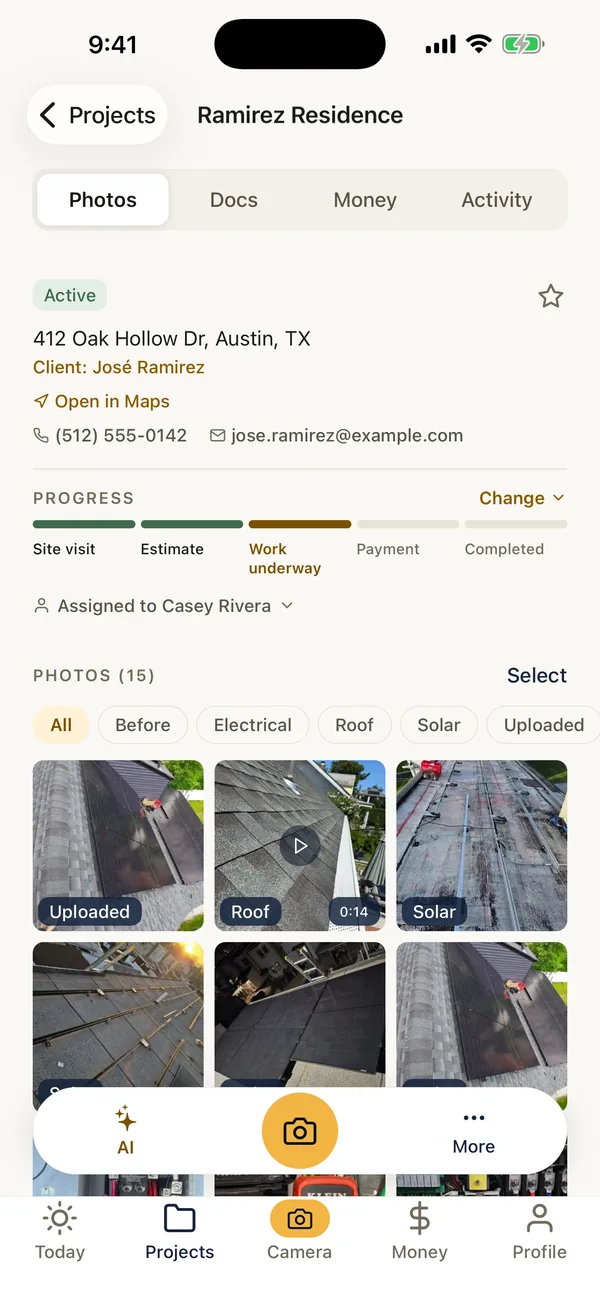
What FieldPix does.
FieldPix makes a branded PDF photo report from a job in one tap. Your logo and company name on the cover, the job address and the client, then each photo with its stamp, grouped by the tags you used on site.
- Photos: stamped with the date, time and address when they are taken, and credited to whoever took them.
- Grouping: by tag (Before, After, Roof, Electrical or your own). Each photo shows who took it and any note.
- Your own layout: report templates built from a cover, all photos or one tag's photos, a checklist, text and a signature box.
- Sending it: share the PDF from the phone, download it in the web portal, or show it on the client's private link.
- Your logo on every plan: branded reports are not an upgrade. $49.99 a month for up to 5 people, $99.99 for unlimited; 14 days free, no card.
What your client or adjuster gets.
A real FieldPix report from a demo job.

Writing reports by hand? Start from the free roof inspection report template or the site visit report template.
From the camera to the PDF.
- Add your logo onceIn the app or the web portal. Every report uses it from then on.
- Shoot inside the jobTap a tag and take the photo. It is stamped and filed before you lower the phone. Watch: Take stamped photos
- Mark what mattersCircle the problem on the photo and add a note. Watch: Draw on photos and leave notes
- Tap ReportPick the report or your own template, and FieldPix builds the PDF with your logo. Share it or save it. Watch: PDF reports in one tap
Questions about photo reports.
Is there an app to take job site photos and make a PDF report with my logo?
Yes. FieldPix is a job site photo app for contractors that turns a job's photos into a PDF report with your logo in one tap. The cover has your logo and company name, the job address and the client, then every photo with the date, time and address burned in, grouped the way you tagged them. Filled-in checklists can go in the same report.
Where does my logo come from?
You add your company logo once in the app or the web portal, and every report uses it from then on. It is on both plans.
What goes in the report?
A cover with your logo, your company name and address, the job address and the client, then the photos grouped by tag. Each photo shows its stamp, who took it, its tags and any note. Filled-in checklists, with their answers and photos, can go first.
Can I choose which photos go in?
Build a report template from sections: a cover page, all photos, the photos with one tag, a checklist, your own text and a signature box. A template with only the photos tagged Damage gives an adjuster just the damage, while the homeowner gets the full job.
How do I send the report?
Open the PDF on your phone and send it on with the share button, download it from the web portal and attach it to an email, or switch it on for the job's private client link.
Can I make reports from the office?
Yes. The web portal opens every job's photos and reports, so the office can download and send them without the crew.
What does FieldPix cost?
Flat per company, not per person: $49.99 a month for up to 5 people, or $99.99 a month for as many as you want. Every feature is on both plans. A plan covers one business and the people who work for it; if you run two companies, each gets its own plan. Pay yearly and get two months free. Every plan starts with a 14-day free trial, no card needed.
 14-day free trial
Make your first branded report.
There's nothing to pay during the trial, and no card to enter.

