A daily log your crew will actually keep.
FieldPix writes the daily log from the photos your crew already takes. Shoot the job as usual, add a short note where a picture needs one, and at the end of the day tap Today: the work, the crew, the delays and the next steps come back as a log to review and share.
14 days free, no card · $49.99/month for your whole crew (up to 5), about $10 a person
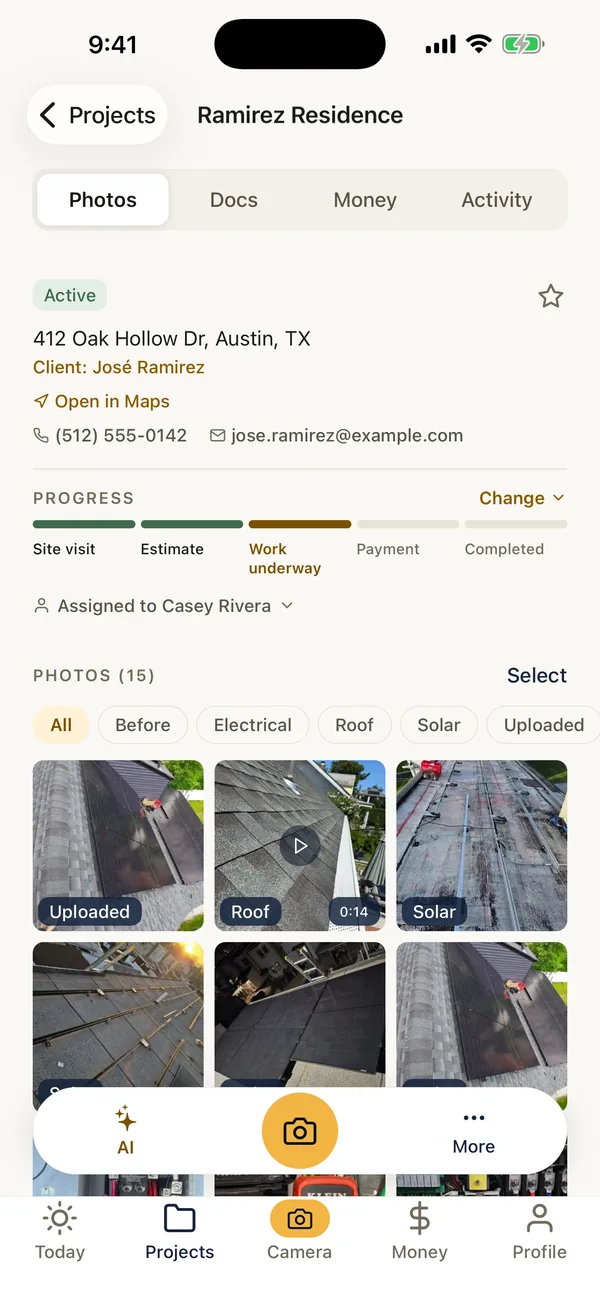
What FieldPix does.
FieldPix is a job site photo app that drafts the daily log from the day's photos. Each photo already carries when it was taken, who took it, where and its tags; add a note to the ones that need words. One tap on Today picks the day's photos and FieldPix writes the log.
- Sections: work performed, areas worked, crew on site, issues and delays, materials and equipment, next steps.
- From your photos: times, names, tags, addresses and photo notes, plus what the pictures show. Nothing made up.
- Reviewed by you: edit anything, add the weather or hours, then share it as a link or a PDF.
- For the office: logs and photos in the web portal the same day.
- For small crews: $49.99 a month covers up to 5 people, every feature included. 14 days free, no card.
From the day's photos to the log.
- Shoot the job as usualEvery photo is stamped with the time and place, filed to the job and credited to whoever took it. Watch: Take stamped photos
- Add a note where it helpsA photo of a late delivery or a wet subfloor says more with one line: what, who, how long. Watch: Draw on photos and leave notes
- Tap TodayFieldPix picks the day's photos and drafts the log, section by section. Watch: AI documents from your photos
- Review and shareEdit it, then send it as a link or a PDF, or leave it for the office in the web portal.
Photos to take, notes to add.
A log is only as good as what goes into it. These make the draft worth keeping.
Photos worth taking
- Each area you worked, at the end of the day
- Deliveries as they arrive
- Anything damaged, missing or wrong
- Work about to be covered up
Notes worth adding
- What held you up, and for how long
- Who asked for a change
- Inspections and what they said
- What is planned for tomorrow
Add before you share
- Weather, if it stopped work
- Hours, if you track them in the log
- Safety: incidents, near misses, talks
FieldPix writes from the photos and notes, so a note on the right photo puts it in the log. Construction daily log template and how to fill it in.
The job's memory, written the same day.
When a schedule slips, a change order is questioned or a payment is held up, the daily log shows what happened on which day. Logs made every day, at the time, are far more convincing than a summary written after a dispute starts. The hard part has always been getting a tired crew lead to write one. If the photos are already on the job, the log is one tap away.
More: site visit notes from your voice · punch list template.
Questions about daily logs.
What is a good daily log app for a small construction crew?
FieldPix is a job site photo app built for small crews that writes the daily log from the day's photos. The crew takes photos on the job as usual, adding a short note where a picture needs one. At the end of the day, tap Today and FieldPix drafts the log: work performed, areas worked, who was on site, issues and delays, materials and equipment, and next steps, with the photos. Review it, then share it as a link or a PDF. One flat price per company: $49.99 a month for up to 5 people.
What goes in the daily log?
Work performed, areas worked, the crew on site (from who took the photos), issues and delays, materials and equipment, and next steps, written from the day's photos: when each was taken, who took it, its tags, the address and any note on it, and what the pictures show. FieldPix only writes what the photos and notes show; it never makes up work or names.
Does it record the weather or the crew's hours?
No. FieldPix doesn't pull in weather or track hours. Add them as a note on a photo, or edit the log before you share it.
How long does it take?
One tap to pick the day's photos and a minute to read the draft. Nobody has to type up a log at the end of a long shift.
Who should make it?
Whoever runs the site that day: a foreman, a lead or the owner. Everyone on the job sees the photos, and the office can read the log in the web portal.
Can I keep using my own template?
Yes. The free construction daily log template in our guides has the full set of parts, including weather and hours, if some days you'd rather fill in a form.
Does it work in Spanish?
Yes. The phone app is in Spanish, and a log can be translated between Spanish and English in a tap.
What does FieldPix cost?
Flat per company, not per person: $49.99 a month for up to 5 people, or $99.99 a month for as many as you want. Every feature is on both plans. A plan covers one business and the people who work for it; if you run two companies, each gets its own plan. Pay yearly and get two months free. Every plan starts with a 14-day free trial, no card needed.
 14-day free trial
Keep tomorrow's daily log in FieldPix.
There's nothing to pay during the trial, and no card to enter.

