Invoice from the job site. Get paid before you leave.
FieldPix turns the job into an invoice with your logo and a pay link for the exact total. Send it by text or email, or take the payment on the spot with Tap to Pay, a QR code or a pay link. The money goes to your own account, and the office sees what's waiting and what's paid.
14 days free, no card · $49.99/month for your whole crew (up to 5), about $10 a person
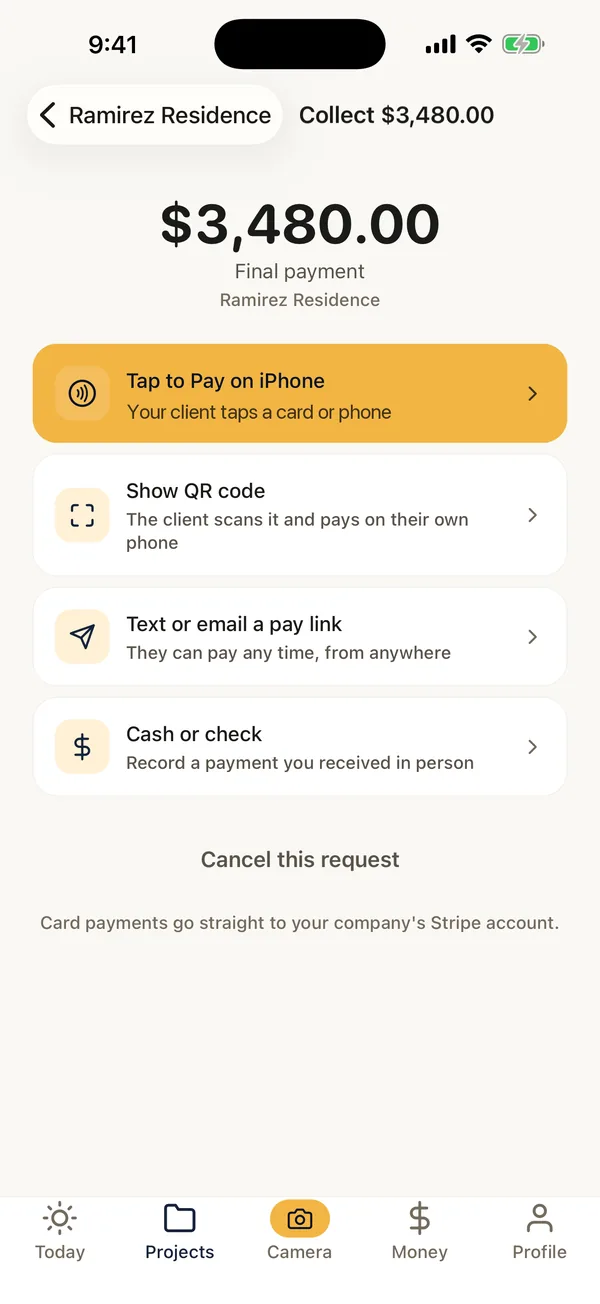
What FieldPix does.
FieldPix is a job site photo app for contractors that also invoices and takes payments. The invoice lives on the same job as the photos, the notes and the signed proposal, so you're not retyping the job into a separate billing app.
- Invoices: line items with quantity and rate, typed in or picked from your price book in the web portal, made into a PDF with your logo and a pay link that matches the total to the penny.
- Send it: as a link or a PDF, by text or email. The client pays by card, Apple Pay or Google Pay from the link.
- Get paid on site: Tap to Pay on iPhone or Android, a QR code, a pay link or card entry. Record cash and checks too.
- Your money: payments go to your own Stripe account. Stripe's fees and a 1% FieldPix fee per card payment.
- Track it: the Money tab shows what's waiting and what's paid on every job; the office can download a spreadsheet for the bookkeeper.
- QuickBooks: invoices and payments can sync to QuickBooks Online.
- Price: every feature on both plans, $49.99 a month for up to 5 people or $99.99 for unlimited. 14 days free, no card.
From the finished job to the money in your account.
- Add the line itemsWhat you did, the quantity and the rate, on the job in the app or the web portal.
- Make the invoiceOne tap makes the PDF with your logo and a pay link for the total. Watch: PDF reports in one tap
- Send it, or collect nowText or email the invoice, or tap Collect and take the payment on the spot. Watch: Get paid on the job
- Watch it come inThe Money tab and the portal's Money page show what's waiting and what's paid. Watch: Get paid and track money
What it does and doesn't do.
- Card payments need a Stripe account, which you connect once. The money goes to you, not to a holding account.
- It is not accounting software. No payroll, expenses or taxes; sync to QuickBooks Online for the books.
- Prices are yours. FieldPix never makes up a price.
- Need the estimate and the signature first? Proposals with photos, e-signatures and deposits are on the same job. Work added after the client signs? Use the free change order template.
Questions about invoices and payments.
What is a good invoice app for contractors?
FieldPix is a job site photo app for contractors that also invoices and takes payments from the phone. Add the line items on the job, make the invoice as a PDF with your logo and a pay link for the exact total, and send it by text or email. The client pays by card, Apple Pay or Google Pay, with no app to install. On site, take the payment by Tap to Pay on iPhone or Android, a QR code, a pay link or card entry, or record cash and checks. Payments go to your own Stripe account, and invoices can sync to QuickBooks Online.
How does the client pay an invoice?
From the pay link on the invoice, in their phone's or computer's browser: card, Apple Pay or Google Pay. Nothing to download or sign up for.
Can I take a payment on the spot?
Yes. In the job, tap Collect, enter the amount and what it's for, and choose Tap to Pay on iPhone or Android, a QR code the client scans, a pay link by text or email, or card entry. Cash and checks can be recorded too.
What does it cost to take payments?
Card payments go to your own Stripe account. Stripe's fees and a 1% FieldPix fee come out of each payment. Recording cash and checks is free.
Can I see what's still owed?
Yes. The Money tab in the app and the Money page in the web portal list every payment request across your jobs: what's waiting and what's paid. The office can download a spreadsheet for any dates for the bookkeeper.
Does it work with QuickBooks?
Yes. Invoices and payments can sync to QuickBooks Online.
Does the app write my prices?
No. You type the line items and prices, or pick them from your price book in the web portal. FieldPix never invents a price.
Is it accounting software?
No. FieldPix invoices and collects; it doesn't do payroll, expenses or taxes. Sync to QuickBooks Online for the books.
What does FieldPix cost?
Flat per company, not per person: $49.99 a month for up to 5 people, or $99.99 a month for as many as you want. Every feature is on both plans. A plan covers one business and the people who work for it; if you run two companies, each gets its own plan. Pay yearly and get two months free. Every plan starts with a 14-day free trial, no card needed.
 14-day free trial
Send your next invoice from FieldPix.
There's nothing to pay during the trial, and no card to enter.

