Inspect on your phone. Hand over the report before you leave.
FieldPix is an inspection app for contractor crews. Load a checklist, answer each question and take the photos it asks for, talk through what you find, and one tap turns it into a PDF report with your logo. Every photo carries the date, time and location.
14 days free, no card · $49.99/month for your whole crew (up to 5), about $10 a person
What FieldPix does.
FieldPix is a job site photo app with inspection checklists built in. Every inspection covers the same points in the same order, every finding has a stamped photo, and the report is ready on site.
- Checklists: 16 built in, including roof, home and mold inspections and solar site surveys. Copy one and change it, or build your own.
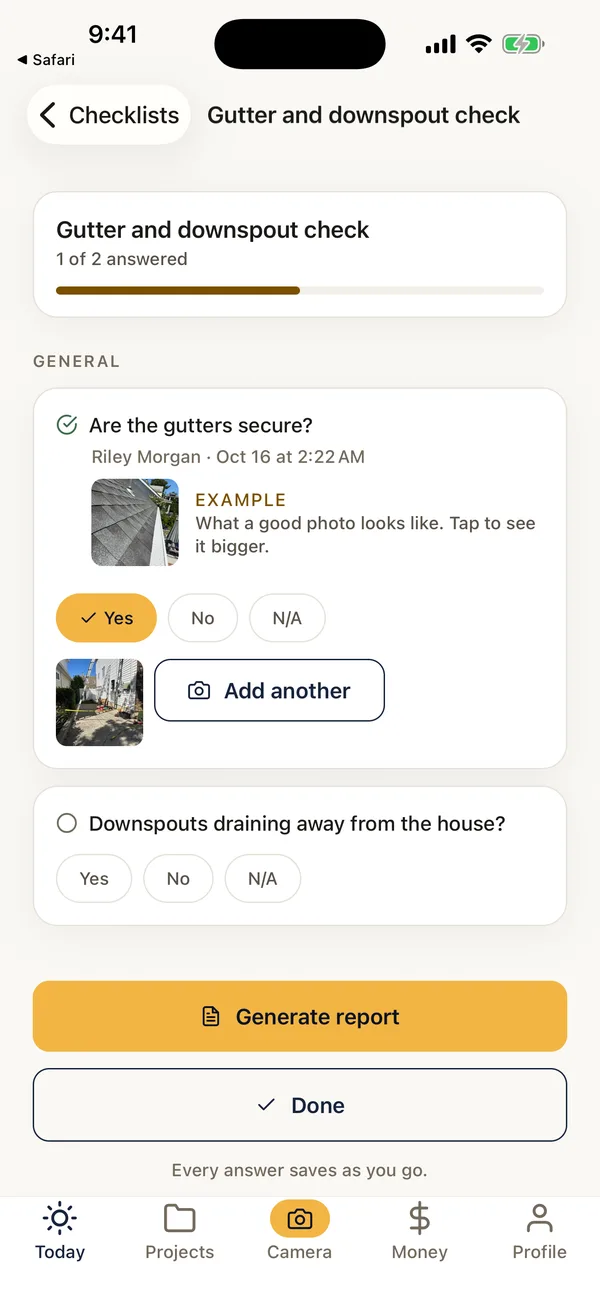
- Photos on any question: taken from the question itself, stamped with the date, time and location, and credited to whoever took them.
- Notes from your voice: talk while you inspect and FieldPix writes the findings by area.
- Who answered: every answer shows who gave it and when.
- The report: a single checklist as a PDF to hand over on site, or the full job report with your logo.
- For the office: filled-in checklists with their photos in the web portal, the same day.
- Price: every feature on both plans, $49.99 a month for up to 5 people or $99.99 for unlimited. 14 days free, no card.
Inspection checklists, ready on day one.
Load one on a job in one tap, or copy it and make it yours.
Roofing and exterior
- Roof inspection: the ground and the attic first, then covering, flashing and penetrations, edges and drainage
Homes and property
- Home inspection
- Mold inspection
- Appraiser walkthrough
- Pre-closing and post-closing walkthroughs
Solar and energy
- Solar site surveys: standard, detailed and NY/NJ
- Solar and battery install checks
- Heat pump install photos, before and after
Your own
- Pre-drywall and framing
- Final walkthrough before handover
- Quality control on your crews' work
- Anything you inspect the same way every time
The built-in checklists' questions are in English. Everything about checklists · printable versions in the guides.
From the checklist to the report.
- Load the checklistA built-in one, or one your company made, on the job. Watch: Checklists for every job
- Inspect and shootAnswer each question and take the photos it asks for. Talk through anything that needs explaining. Watch: Walk the site with AI
- Hand over the reportOne tap makes the PDF with your logo, to send before you leave. Watch: PDF reports in one tap
- Fix what you foundTurn findings into tasks for the crew, with the photo attached. Watch: Tasks for your crew
What it does and doesn't do.
- Checklists need a signal. Photos and walkthrough recordings save on the phone with no signal; checklist answers and their photos need a connection. What works offline.
- It records; you judge. FieldPix doesn't check answers against code or produce a state-specific report format.
- Free printable checklists: roof, home, mold, pre-drywall and final walkthrough.
Questions about inspections.
What is a good inspection app for contractors?
FieldPix is a job site photo app for contractors with inspection checklists built in. Load a checklist on the job, answer each question on your phone and take the photos it asks for; every photo carries the date, time and location. Talk through what you find and FieldPix writes the notes by area. One tap turns the finished inspection into a PDF report with your logo. Sixteen checklists are built in, from roof, home and mold inspections to solar site surveys, and you can build your own for any inspection you do.
Which inspection checklists are built in?
Roof inspection, home inspection, mold inspection, solar site surveys (standard, detailed and NY/NJ), solar and battery install checks, a heat pump install photo list, an appraiser walkthrough, and pre-closing and post-closing walkthroughs. Copy any of them and change the questions.
Can I build my own inspection checklist?
Yes, on the phone or in the web portal. Questions can be yes or no, one or several choices, a written answer such as a reading, or a photo, and any question can ask for photos as well. Add an example photo under a question to show the crew what a good shot looks like.
Can I send the inspection report right away?
Yes. One tap makes a PDF of a single checklist, with the cover page, every answer and its photos, to hand over before you leave. The full job report with all the photos is one tap too.
Can I record notes instead of typing them?
Yes. Record a walkthrough while you inspect and FieldPix writes the notes by area, with your measurements and problems as you said them and the photos filed under each area.
Does it work with no signal?
Photos and walkthrough recordings save on the phone and upload when you're back in range. Checklist answers and checklist photos need a connection, so fill those in once you have signal.
Does FieldPix check my answers against code?
No. FieldPix records what you inspect and find, and puts it in a clear report. It doesn't know your local code or a state's required report format, and it doesn't replace your judgment or license.
What does FieldPix cost?
Flat per company, not per person: $49.99 a month for up to 5 people, or $99.99 a month for as many as you want. Every feature is on both plans. A plan covers one business and the people who work for it; if you run two companies, each gets its own plan. Pay yearly and get two months free. Every plan starts with a 14-day free trial, no card needed.
 14-day free trial
Run your next inspection in FieldPix.
There's nothing to pay during the trial, and no card to enter.

