A punch list your crew actually closes out.
FieldPix puts a punch list on every job. Snap the problem, tap Task and pick who it's for: they get a notification with the photo, it waits on their Today screen until it's done, and you hear when it's checked off. No more items lost in texts and sticky notes.
14 days free, no card · $49.99/month for your whole crew (up to 5), about $10 a person
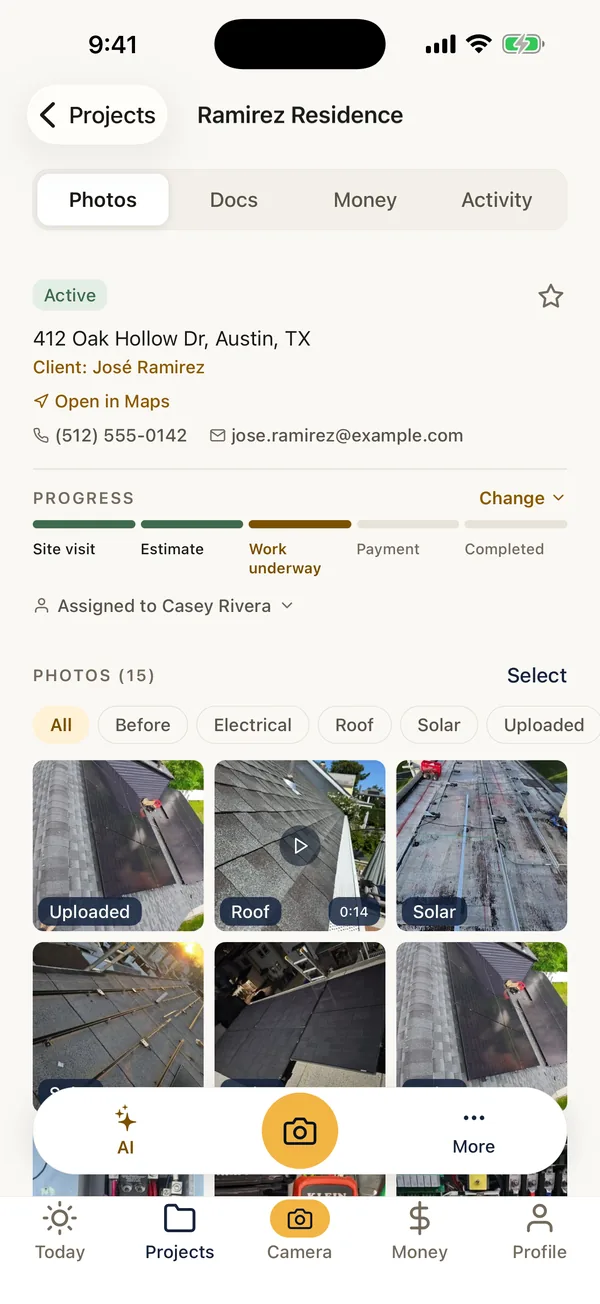
What FieldPix does.
FieldPix is a job site photo app with a punch list on every job. Each job has Tasks: what needs doing, who it's for, when it's due, and who checked it off. Make one from scratch or straight from a photo, so the person fixing it sees exactly where and what.
- Task from a photo: open the photo, tap Task, and the photo goes with it.
- Assign and notify: pick one or more people and a due date; they get a notification.
- On Today: everyone's open tasks wait on their Today screen, wherever they are in the app.
- Closed out: checking a task off tells whoever made it, with who did it and when.
- For the office: every job's tasks in the web portal, and project templates that start each job with your standard items.
- AI punch list: FieldPix can draft a punch list document from a walkthrough or the job's photos, to review and share as a link or a PDF.
- Price: every feature on both plans, $49.99 a month for up to 5 people or $99.99 for unlimited. 14 days free, no card.
From the walk to the last check mark.
- Walk the jobTake photos of everything that's left, or record a walkthrough and talk through it. Watch: Walk the site with AI
- Make a task from each photoTap Task, say what done looks like, pick who it's for and a due date. Watch: Tasks for your crew
- The crew works the listTheir tasks are on Today. They check each one off when it's fixed, ideally with an after photo.
- The office follows alongOpen items on every job, in the web portal. Watch: Tasks on the web portal
What it does and doesn't do.
- Tasks are for your team. The client doesn't see them; share the AI punch list or the photo report with the client instead.
- FieldPix writes from what you show and say. The AI punch list holds the items in your notes and photos, nothing it made up, and you edit it before it goes anywhere.
- Prefer paper or a spreadsheet for the walk? The free punch list template comes in Excel, Word and PDF, with tips on writing items anyone can fix.
- Before the drywall goes up? The pre-drywall inspection checklist catches what's cheapest to fix before it's covered.
Questions about punch lists.
What is a good punch list app for contractors?
FieldPix is a job site photo app for contractors with a punch list on every job. Snap the problem, tap Task, say what needs doing and pick who it's for: they get a notification, the photo goes with the task, and it shows on their Today screen until they check it off. Whoever made the task hears when it's done, and the office follows every open item in the web portal. One flat price per company: $49.99 a month for up to 5 people.
Can I make a punch list from photos?
Yes. Open any photo on the job and tap Task: the photo is attached, so whoever fixes it sees exactly where and what. FieldPix can also draft a punch list document from a walkthrough or from the job's photos, which you review and share as a link or a PDF.
Can I assign items and set due dates?
Yes. Each task can go to one or more people on your team, with a due date and a note. They get a notification, and the task waits on their Today screen until it's done.
How do I know when an item is done?
The person checks it off on their phone, and whoever made the task is told. Each finished task shows who checked it off and when.
Can every job start with the same punch list?
Yes. Project templates in the web portal start a new job with your standard tasks, checklists, labels and stage, so recurring close-out items are there from day one.
Can the client see the punch list?
Tasks are for your team. To give the client a punch list, share the punch list document FieldPix drafts as a link or a PDF, or send the job's photo report.
Is there a free punch list template?
Yes. The punch list template in our guides comes in Excel, Word and PDF, with the columns that work: where, what is wrong and what done looks like, who, due date, done and photos.
What does FieldPix cost?
Flat per company, not per person: $49.99 a month for up to 5 people, or $99.99 a month for as many as you want. Every feature is on both plans. A plan covers one business and the people who work for it; if you run two companies, each gets its own plan. Pay yearly and get two months free. Every plan starts with a 14-day free trial, no card needed.
 14-day free trial
Close out your next job in FieldPix.
There's nothing to pay during the trial, and no card to enter.

